Keywords: GitHub | Markdown | Mathematical Equations | LaTeX | HTML Entities
Abstract: This article provides an in-depth exploration of various methods for displaying mathematical equations in GitHub Markdown. It begins by analyzing the limitations of GitHub's use of the SunDown library for secure Markdown parsing, explaining why direct JavaScript embedding with MathJax fails to work. The paper then details two practical alternative approaches: using HTML entity codes for simple mathematical symbols and leveraging external LaTeX rendering services to generate equation images. The discussion covers the importance of URL encoding and provides concrete code examples with best practice recommendations, helping readers choose appropriate mathematical display solutions for different scenarios.
Analysis of GitHub Markdown Parsing Mechanism
GitHub utilizes the SunDown library (formerly known as libUpSkirt) for parsing and rendering Markdown documents. The library's design philosophy emphasizes "standards compliant, fast, secure markdown processing library in C," with security being a core design principle. Due to security considerations, GitHub's Markdown parser filters or escapes all content that resembles HTML tags, including <script> tags. This means that solutions involving direct JavaScript code embedding (such as MathJax) cannot function properly on GitHub.
HTML Entity Rendering for Simple Mathematical Symbols
For basic mathematical symbols and formulas, HTML entity codes can be used to achieve inline rendering. This method is suitable for simple mathematical expressions and maintains good compatibility across all Markdown environments.
Example code:
h<sub>&theta;</sub>(x) = &theta;<sub>o</sub> x + &theta;<sub>1</sub>xThis code renders as: h<sub>θ</sub>(x) = θ<sub>o</sub> x + θ<sub>1</sub>x. Here, θ is the HTML entity code for the Greek letter θ, while <sub> and </sub> are used to create subscript text.
External Rendering Service Solutions for Complex Formulas
For more complex mathematical formulas, external LaTeX rendering services are recommended. These services convert LaTeX code into images, which can then be embedded into documents using Markdown image syntax.
Using the CodeCogs service as an example, the complete process for creating formula images:
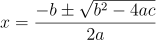The URL in this code contains percent-encoded LaTeX formulas, which the server renders as SVG images. The SVG format offers excellent scaling performance, making it suitable for display on various devices.
Importance of URL Encoding
When using external rendering services, URL encoding is crucial for ensuring formulas display correctly. Special characters in LaTeX formulas (such as spaces, parentheses, operators, etc.) require percent encoding; otherwise, rendering may fail or display errors.
Encoding example:
Original formula: x=\frac{-b\pm\sqrt{b^2-4ac}}{2a}
Encoded: x%3D%5Cfrac%7B-b%5Cpm%5Csqrt%7Bb%5E2-4ac%7D%7D%7B2a%7D
Handling Multi-line Formulas
For complex formulas requiring multi-line display, a segmented rendering strategy can be employed. Break long formulas into multiple parts, render them using separate image tags, and then combine them in the document.
Implementation code example:

Practical Recommendations and Considerations
When selecting mathematical formula rendering solutions, consider the complexity of the formulas and the maintainability of the document. For simple symbols and expressions, the HTML entity code approach offers the best compatibility and loading performance. For complex formulas, external rendering services, while requiring network connectivity, provide higher-quality mathematical typesetting.
Additionally, it is advisable to retain the original LaTeX code as alternative text for images, ensuring that readers can understand the formula content even if image loading fails. Regularly verify that the rendering services used remain operational, as third-party services may cease operations or change their APIs.